Keeping your home secure while preserving convenient entry is easier with smart locks that fit over standard deadbolts. The following five models are designed to retrofit doors without replacing the existing bolt, offering a mix of built-in Wi‑Fi, multiple unlock methods, and smart home compatibility. This guide compares features to help you choose the right fit for your front door, whether you want hands-free voice control, app-based access, or a robust keypad and fingerprint option.
| Product | Key Features | Connectivity |
|---|---|---|
| Philips Wi‑Fi Door Lock | Wi‑Fi remote control, fingerprint, passcode, voice with Alexa/Google, auto lock | Built‑in Wi‑Fi (2.4 GHz) |
| eufy Security Smart Lock C220 | 8 months battery, fingerprint, keypad, app remote, voice control | Built‑in Wi‑Fi |
| Firstriver WiFi Smart Lock | 6 unlock methods, fingerprint, keypad, IC card, voice | Built‑in Wi‑Fi |
| Schlage Encode Smart WiFi Deadbolt | 100 user codes, app access, voice control | Built‑in Wi‑Fi |
| X3 Apple Home Key Door Lock (ThorBolt) | Apple Home Key, Thread, fingerprint, remote control | Wi‑Fi via app; Thread |
Philips Wi‑Fi Door Lock

Philips offers flexible unlocking options, including app control, fingerprint, passcode, physical key, and voice control via Alexa or Google Assistant. The built‑in Wi‑Fi enables remote locking and unlocking from anywhere, without an extra hub. Note that the lock supports 2.4 GHz networks only, and batteries are required separately. This model emphasizes family‑friendly versatility, allowing different entry methods for different users.
Key features include remote access from the Philips Home Access App, real‑time notifications, and customizable access permissions. It supports voice commands when paired with a compatible voice assistant and maintains a straightforward physical keypad for backup entry. Installation over an existing deadbolt preserves your door hardware while upgrading security and convenience.
eufy Security Smart Lock C220

The eufy C220 combines biometric access with a built‑in Wi‑Fi module for remote control via the app. Its self‑learning fingerprint technology improves recognition accuracy over time, reducing unlock attempts. It supports multiple unlock methods, including fingerprint, keypad, app, and voice commands through Alexa or Google Assistant. An 8‑month battery life claim is supported by eight AA batteries, though actual duration varies with usage.
With no bridge required, the lock connects directly to your network and provides real‑time notifications, event history, and remote access from anywhere. It integrates into the broader eufy ecosystem, making it a strong choice for homes already using eufy doorbells or cameras. If you value long‑term power and a robust app experience, this model offers a balanced mix of convenience and security.
Firstriver WiFi Smart Lock
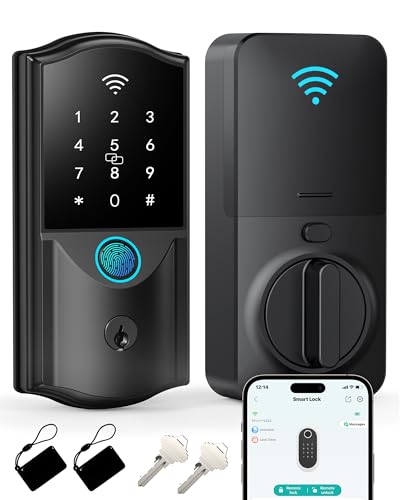
Firstriver’s model emphasizes flexible access with built‑in Wi‑Fi so you can lock or unlock from anywhere without a hub. It supports six unlock methods, including app, fingerprint, passcode, IC card, mechanical key, and voice control with Alexa or Google Assistant. Fast fingerprint recognition aims to offer near‑instant access (fingerprint unlock in about 0.3 seconds; entry in roughly 1.5 seconds), balancing speed with security.
The lock’s direct Wi‑Fi connection enables remote management, access permissions, and activity history. The device is designed to work well for households with guests or service personnel by providing controlled, temporary access codes. If you value multiple entry options and responsive fingerprint performance, Firstriver presents a compelling option for a door won’t require changing your existing deadbolt.
Schlage Encode Smart WiFi Deadbolt

The Schlage Encode line emphasizes remote access and guest management. Its built‑in Wi‑Fi allows control and monitoring from anywhere via the Schlage Home app, plus up to 100 access codes for versatile guest and tenant arrangements. The system supports optional voice control with Alexa and Google Assistant for hands‑free entry, and it can handle multiple locks from a single app interface. This model is well suited for renters or households needing detailed access scheduling and auditing.
With strong security features, the Encode integrates with smart home ecosystems, and users can receive notifications and view lock history. The satin nickel variant adds a contemporary finish that matches many door styles. If you need broad guest management and reliable cloud connectivity, Schlage Encode provides comprehensive options without an additional hub.
X3 Apple Home Key Door Lock (ThorBolt)
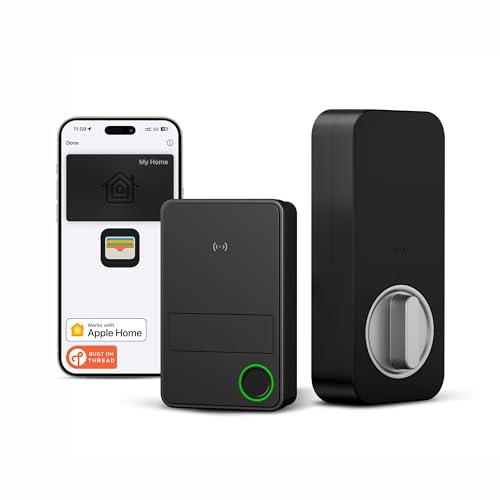
The X3 ThorBolt centers on Apple Home Key compatibility and Thread networking. It uses a NFC sensing zone to enable quick unlocking with Apple Wallet on iPhone or Apple Watch. Thread support offers energy‑efficient, low‑latency connectivity with compatible hubs, reducing the need for traditional Wi‑Fi reliance. It includes fingerprint access and remote control through the Sleekpoint app, managing up to 50 users and keeping activity logs for security oversight.
This model targets Apple users seeking seamless integration with iOS devices and a future‑proof home network via Thread. If you are invested in Apple Home ecosystem and want borderless interoperability with Thread, the X3 provides a forward‑looking option, albeit with a narrower platform focus than broader Wi‑Fi locks.
Buying Guide
- Compatibility and hub requirements: Some models rely on built‑in Wi‑Fi, while others integrate with Thread or require a separate hub. Consider your existing smart home setup and whether you want a hubless experience.
- Unlock options and user management: Evaluate how many unlock methods you need (app, fingerprint, keypad, voice, cards) and whether you need guest codes or time‑restricted access for services or renters.
- Power and reliability: Battery life varies by model and usage. Look for security features like low battery alerts and backup entry methods to avoid lockouts.
- Security features: Review audit trails, notifications, tamper alerts, and compatibility with voice assistants to ensure safe operation for your household.
- Installation and door fit: Over‑deadbolt designs are intended to retrofit existing hardware. Check the lock dimensions and compatibility with your door thickness and deadbolt position to ensure a proper fit.
- Smart home integration: If you use Apple HomeKit, Google Home, Alexa, or a specific security system, verify platform support and routines that automate entry events and door status alerts.
- Data privacy: Some locks send data to cloud services; understand how data is stored and what information is logged to protect household privacy.