Designing a workstation that reduces neck strain and boosts productivity starts with a solid dual monitor arm. The right desk-mounted system elevates screens to eye level, enables full movement, and keeps cables organized. This guide highlights five top options that balance weight capacity, range of motion, and ease of installation. Each model supports common VESA patterns and fits a range of screen sizes, helping you tailor your setup for work, gaming, design, or programming.
Summary of selected products:
| Product | Brand | Screen Size Range | Weight per Monitor | Mount Type |
|---|---|---|---|---|
| STAND-V002O | VIVO | 17″–32″ | 4.4–19.8 lbs | Desk Mount, Pneumatic Arm |
| STAND-V002 | VIVO | 13″–30″ | Up to 22 lbs | Desk Mount, Heavy Duty |
| HUANUO 17-32 Inch Dual Monitor Stand | HUANUO | 17″–32″ | Up to 19.8 lbs | Gas Spring Desk Mount |
| MOUNTUP Dual Monitor Stand | MOUNTUP | 17″–32″ | 4.4–17.6 lbs | Desk Mount, C-Clamp/Grommet |
| Freelift Dual Monitor Arm Desk Mount | FREELIFT | 13″–32″ | 4.4–22 lbs | Desk Mount, Clamp/Grommet |
VIVO Dual Monitor up to 32 Inches and 19.8 lbs per Screen
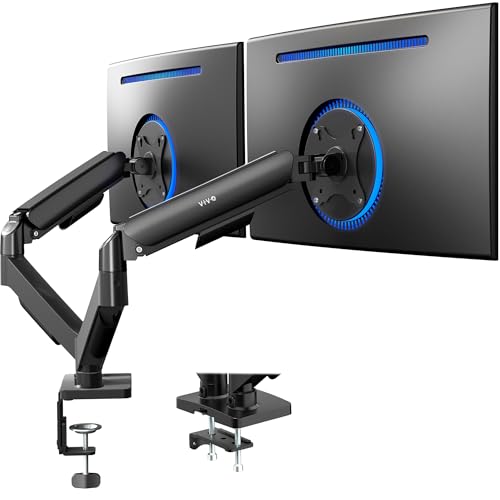
The VIVO STAND-V002O is a two-arm desk mount designed for screens up to 32 inches, with a per-screen weight tolerance of 4.4–19.8 pounds. Each monitor attaches via VESA 75x75mm or 100x100mm patterns. The pneumatic counterbalance provides tool-free, smooth placement and stabilizes screens as you adjust them in any direction. Note that the back of the arms may extend beyond the desk edge, so users should plan desk depth accordingly. The arm supports +90° to -90° tilt, 180° swivel, and 360° rotation for versatile viewing angles.
- VESA compatibility: 75x75mm / 100x100mm
- Weight per monitor: 4.4–19.8 lbs
- Rotation: 360°, Tilt: +/- 90°, Swivel: 180°
- Maximum screen size: 32 inches
VIVO Dual Monitor Desk Mount, Holds 2 Screens Up To 30 Inches

VIVO STAND-V002 is a sturdy two-screen desk mount built to support two monitors up to 30 inches and 22 pounds each, using VESA 75x75mm or 100x100mm mounts. The design includes cable management clips along the arms and center pole to minimize clutter. It offers +90° to -90° tilt, 180° swivel, 360° rotation, and height adjustment along the central pole, allowing portrait or landscape layouts. Choose the included heavy-duty C-clamp or the optional grommet mount for desk installation up to 3.25 inches thick, ensuring a secure fit for most home or office desks.
- Two-monitor compatibility: 13″–30″ and up to 22 lbs each
- C-clamp or grommet mounting options
- Full motion: tilt, swivel, rotate, and height adjust
HUANUO 17-32 Inch Dual Monitor Stand

The HUANUO dual monitor stand uses gas spring technology for two monitors up to 32 inches and 19.8 pounds per arm. It supports VESA 75x75mm and 100x100mm patterns. The stand offers +90° to -60° tilt, 180° swivel, and 360° rotation, with an optional extra height adjustment up to 25.19 inches thanks to an extended arm. This model emphasizes ergonomic positioning, enabling eye-level alignment and better posture during long work sessions. Installation supports both desk clamp and grommet mounting options for flexible placement.
- Gas spring counterbalance for smooth adjustments
- Height extension for improved ergonomics
- Full motion with tilt, swivel, and rotation
MOUNTUP Dual Monitor Stand for Desk

The MOUNTUP dual monitor stand supports 17–32 inch screens, with a weight range of 4.4–17.6 pounds per monitor. It uses VESA 75x75mm or 100x100mm patterns and provides a full-motion experience with 135° tilt, 180° swivel, and 360° rotation. The system includes a C-clamp or grommet base for mounting on desks up to 4.53 inches thick (clamp) or 3.15 inches thick (grommet). It emphasizes ergonomic, adjustable placement and a clean aesthetic that fits various office styles. Each arm is independently adjustable for better collaboration or multi-tasking setups.
- Independent monitor positioning
- Clamp or grommet base mounting
- Wide tilt, swivel, and rotate ranges
Freelift Dual Monitor Arm Desk Mount

The Freelift dual monitor arm supports 13–32 inch displays with per-monitor weights of 4.4–22 pounds. It accommodates VESA patterns of 75x75mm and 100x100mm and offers a robust range of motion with tilt, swivel, and rotation. The design includes a clamp or grommet base for secure desk mounting, and a high maximum extension and height allow you to position monitors at optimal eye level. It provides a practical option for users seeking a cost-effective, fully adjustable dual-monitor solution with straightforward installation.
- Compatible with 13″–32″ monitors
- VESA 75×75 / 100×100 mm
- Clamp or grommet mounting with broad motion range
Buying Guide: Key Purchase Considerations
-
<li Monitor compatibility: Check screen size, weight, and VESA pattern. Most arms listed support 13"–32" and 4.4–22 lbs per monitor with 75x75mm or 100x100mm mounting patterns.
<li Motion and flexibility: Look for tilt, swivel, and rotation ranges that fit your tasks. A wide tilt angle helps reduce glare, while 360° rotation allows portrait or landscape views.
<li Mounting options: C-clamp is common for desks, with grommet mounting as an alternative. Consider desk thickness and whether you prefer a clamp vs. bolt-through or grommet mount.
<li Weight distribution and stiffness: Pneumatic or gas-spring systems offer smoother, tool-free adjustments but may require occasional maintenance. Solid steel/aluminum builds improve long-term stability for heavier setups.
<li Ergonomics and workflow: Elevating monitors to eye level reduces neck strain. Additional height or extendable arms help position screens for seated or standing work and video calls.
<li Desk space and reach: Consider whether arms extend beyond the desk edge and how that impacts cable routing, desk depth, and clearance for a keyboard tray or keyboard in front of the monitors.
<li Installation complexity: Some models advertise easier, tool-free adjustments, while others require more assembly. Review included hardware and instruction clarity.
<li Aesthetics and cable management: A clean, integrated cable route reduces clutter. Some models include built-in clips and channels to keep cords organized.
Each option above targets different priorities—from compact installation and robust weight support to extended reach and ergonomic height. When selecting a desk-mounted dual monitor arm, prioritize the monitors’ size, weight, and mounting pattern, then balance this with your desk setup, preferred movement, and whether you value quick adjustability or maximum stability over time.