Finding a monitor stand that combines sturdy support with built-in power options can streamline your workspace. This guide showcases five top-rated dual-monitor stands with power strips, designed to keep cables tidy and devices charged while you work or game. Each pick pairs solid build quality with convenient electronics access, so you can power monitors, chargers, and peripherals directly at your desk. Explore practical options that suit different desk styles, monitor sizes, and mounting preferences.
| Product | Brand | Key Benefit | Monitors Supported |
|---|---|---|---|
| Perlegear Dual Monitor Stand with Power Strip | Perlegear | Glass base, solid stability | 2 monitors up to 32″ each |
| HUANUO Dual Monitor Mount with Power Outlet | HUANUO | Strong glass base, four height levels | 2 monitors up to 32″ |
| Vaydeer All-in-One Dual Monitor Stand Riser | Vaydeer | 8 USB ports, wireless charging, drawers | 2 monitors |
| HUANUO Dual Monitor Stand with Power Outlet | HUANUO | Sturdy post, ergonomic height adjustment | 2 monitors up to 32″ |
| Jgstkcity Desk Clamp Power Strip | Jgstkcity | Edge-mount surge protection with PD USB-C | Designed for a single desk edge |
Perlegear Dual Monitor Stand With Power Strip
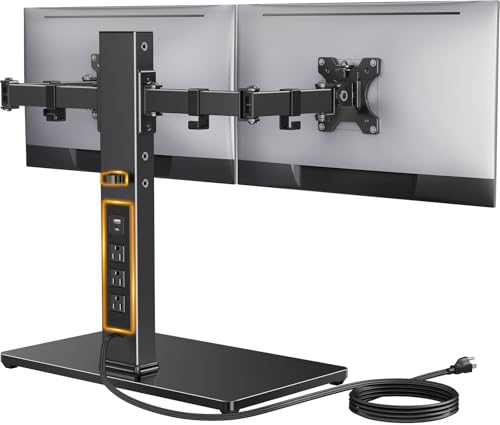
The Perlegear model supports most 13″–32″ screens up to 22 lbs per arm and offers VESA mounting 75x75mm or 100x100mm. A built-in 6.5-foot power strip includes USB-A, USB-C, and three AC outlets for convenient desktop power. Cable management keeps cables organized, and a tempered-glass base with a thick steel column delivers enhanced stability for larger displays.
HUANUO Dual Monitor Mount With Power Outlet
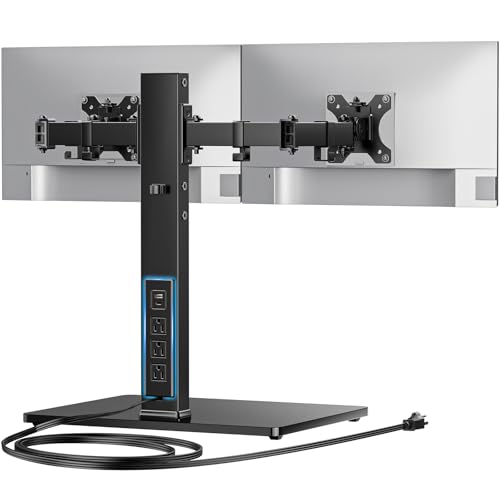
This dual monitor stand includes an integrated power outlet with USB-A, USB-C, and three AC outlets, plus a 6.5 ft cord. It supports 13″–32″ displays up to 22 lbs, with a sturdy tempered-glass base and a thick rectangular post for maximum stability. Four height settings (9.27″ to 15.26″) help you tailor ergonomics to reduce neck and eye strain.
Vaydeer All-in-One Dual Monitor Stand Riser

Vaydeer combines a dual monitor riser with 8 USB ports (4 fast charging, 4 data transfer), a 15W wireless charging pad, and LED light strip. The unit includes two drawers, abundant 1000mm length by 283mm width by 140mm height dimensions, and a robust metal frame supporting up to 50kg. This design aims to consolidate charging, storage, and display into one elevated platform.
HUANUO Dual Monitor Stand With Power Outlet (Second Model)
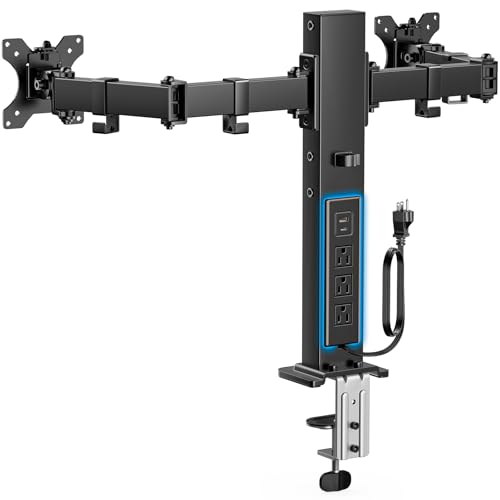
This HUANUO option emphasizes integrated power for a cleaner desk. A strong post design, 1.57″ x 2.76″ cross-section, and arms supporting up to 22 lbs each deliver reliable support. Four height settings provide ergonomic adjustments from 9.27″ to 15.26″. It also supports clamp and grommet mounting for added desk compatibility.
Jgstkcity Desk Clamp Power Strip USB C

Designed to clamp onto the desk edge, this power dock features PD USB-C ports (two 20W PD), multiple USB-A ports, and five outlets. It provides 40W total charging with a 6-foot cord and a 1200 Joules rating. It’s a compact fit for edge-ready desks and helps consolidate charging across devices.
Artswish Adjustable Monitor Riser Stand With Power Outlet

Artswish offers an adjustable riser that extends to 45.2″ with built-in power and storage. A built-in power station includes 2 AC outlets and 2 USB ports, plus a 4.9ft cord and cable management hole. Two sliding-door compartments and adjustable feet keep keyboards and gadgets organized in a tidy, modular desk setup.
NIFBANG Monitor Stand Riser With USB Hub

This stand includes a USB-C docking station with 4 USB 3.0 ports and two USB-C/PD ports (one 18W, one 30W). It features adjustable height (4.5″–6.3″) with a knob lift for single-handed changes and a sturdy ABS construction designed to bear up to 50 pounds. It fits monitors, laptops, printers, and more on a compact riser.
Buying Guide: Key Purchase Considerations
- Monitor compatibility: Check VESA patterns (75x75mm or 100x100mm) and total weight per arm to ensure fit with your screens, especially if you plan to mount larger or curved displays.
- Power and charging needs: Consider how many USB ports, USB-C PD, and AC outlets you require. A model with USB-C PD provides faster charging for newer devices.
- Stability and build quality: Look for tempered-glass bases or reinforced steel posts, especially for top-heavy or large dual setups. A wider base reduces wobble during adjustments.
- Ergonomics: Adjustable height ranges and tilt/swivel capabilities help optimize viewing angles and reduce neck strain. Four-way adjustability is common for dual-arm stands.
- Cable management: Built-in channels, clips, and grommets contribute to a cleaner desk. Decide if you want full under-desk cable routing or surface-level concealment.
- Desk compatibility: If your desk has limited edge space or sits flush against a wall, clamps or grommet mounts offer different installation options. Free-standing bases work well on larger desks.
- Storage and extra features: Some models add drawers, LED light strips, or wireless charging pads. Evaluate whether these extras improve workflow or create clutter.
- Installation effort: Some stands require professional assembly or tools; others are straightforward with a few screws and a quick clamp mount.
When choosing, balance your display size, desk space, and the need for on-disk power. Dual-monitor stands with integrated outlets can significantly reduce desk clutter by consolidating power and data connections in one hub. If you frequently reconfigure displays, prioritize height-adjustable arms and stable bases. For the most comprehensive desk upgrade, consider models with wireless charging or multiple USB ports to streamline device charging and data transfer.